


Chess Online & Offline
4.72.33K Reviews
App Specs
- Version
- 3.0.7
- Updated On
- License
- Free
- Downloads
- 10,000,000+
- Developer
- Splend Apps
- Categories
- Board
- Platform
- Android
Screenshots
 Analysis by AppCompare
I like having a chessboard available for a quick game, but I don’t think every player needs the same kind of chess app. Chess Online & Offline is a free board game from Splend Apps, and its appeal is right there in the name: it brings online and offline chess together. It has a 4.8 average from around 421,000 ratings, with more than 10 million installs, so it has clearly reached a large audience. Those figures suggest broad appeal, but the more useful question is whether its mix of play and practice fits the way you want to use chess on your phone.
Getting Started with Chess Online & Offline
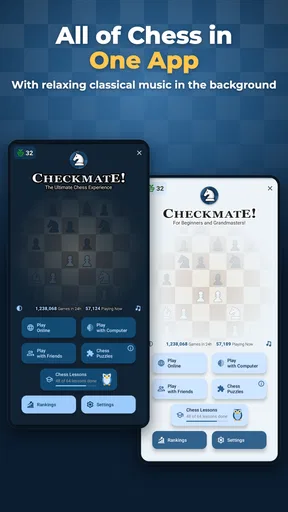
Alright, let's dive right in. The first thing you'll notice about the Chess Online & Offline app is its user-friendly interface. As soon as you open the app, you're greeted with a straightforward menu that makes navigation a breeze. No faffing about with complicated settings here! You have the option to jump straight into a game, either online with players from around the globe or offline against a clever AI that can be adjusted to match your skill level.
What the free access means
The game is free to download and play, which makes it easy to try without committing money upfront. In-app purchases are listed at $2.99 per item, but that price alone doesn’t tell me what each purchase contains or whether it changes the experience in a way you’ll care about. I’d treat the free version as the sensible starting point: play first, decide whether anything you encounter is worth paying for, and don’t assume a purchase is necessary to enjoy chess here.
That distinction matters because chess itself doesn’t need a paid entry point to be enjoyable. If your goal is simply to fit a game into a break, learn the rules, or play against someone online, free access is the main value. If you’re considering spending, look at the specific item and decide whether it solves a real annoyance or adds something you personally want. I wouldn’t buy anything just because the app offers it.
Features to Enhance Your Game
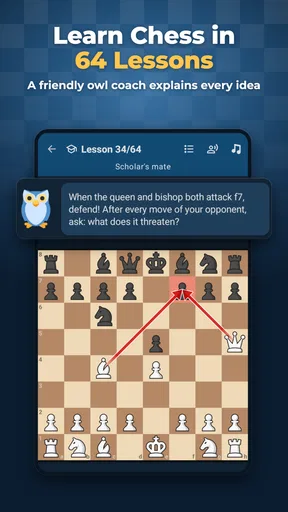
Now, let's talk features. One of the standout aspects of this app is its robust tutorial section. For those new to the game, there’s a series of lessons that guide you through the basics, from piece movement to advanced strategies. It’s like having your own personal chess coach in your pocket!
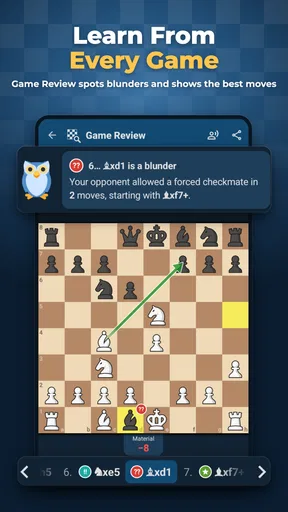
For the more seasoned players, the app offers a variety of game modes including blitz, bullet, and classical time controls. These different modes allow you to test your skills under pressure or take your time to plan that perfect checkmate. Plus, the app tracks your progress and provides detailed analytics on your games, helping you identify strengths and areas for improvement. Pretty neat, right?
To get more out of practice, I’d avoid treating every game as a test of whether you won. After a close loss, choose one moment you remember—an exposed king, a missed capture, or a move made too quickly—and use it as the focus for your next session. That small habit turns a casual match into useful repetition. It also helps beginners avoid the common trap of hopping between lessons and games without giving either enough attention to stick.
Worth Reading Before You Choose

Flipboard Shows What News Apps Must Do Beyond the Feed

Switching to Android Auto Means Rethinking Your Driving Routine

Google Calendar Makes a Crowded Week Easier to Manage

Ludo King Makes the Most of the Minutes Between Plans

Baby Panda World Brings Quick Play to Modern Phones, but Its Game Library Feels Busy

ESPN’s Live Game View Makes Following Close Games Easier
Time controls change the kind of thinking the game rewards. A fast format can be fun when you have only a few minutes, but it encourages quick decisions and may reinforce rushed habits if you’re still learning. Longer games are a better fit when you want to consider a plan and understand why a move works. I’d use faster play for entertainment and longer sessions for deliberate practice rather than expecting one mode to do both jobs equally well.
Online Play: Connect and Compete
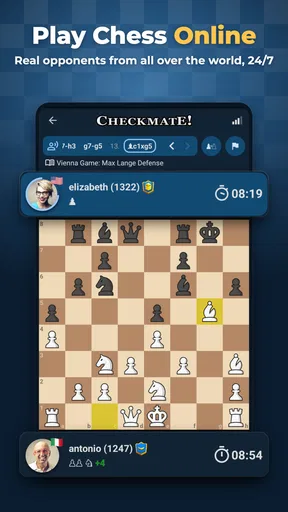
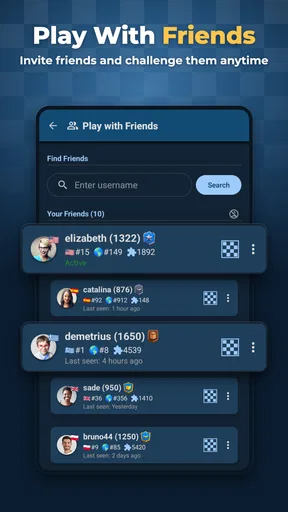
Feeling competitive? The online play feature is where this app really shines. You can challenge friends or random opponents, and there's a built-in chat function so you can exchange pleasantries—or trash talk, if that's your style. The matchmaking system does a great job of pairing you with players at your level, ensuring that every match is both challenging and fun.
And, if you're worried about cheaters ruining your experience, the app has a solid anti-cheat system in place. This means you can focus on what really matters: honing your skills and enjoying the game.
Online chess is most useful when you want a real opponent rather than another practice position. A realistic everyday use is a short game during a lunch break: you can choose a time format that suits the gap you have, then return to your day without needing a physical board or a playing partner nearby. For a friend who lives elsewhere, an online challenge can also make chess an easy shared activity. The trade-off is that online play depends on having a suitable connection and enough uninterrupted time to finish the kind of game you choose.
Chat can make a match feel more social, but it isn’t essential to the chess itself. If you prefer to concentrate, you can simply treat the game as a board and focus on your moves. When playing someone you don’t know, I’d keep conversation light and avoid sharing personal details; a built-in chat is a convenience, not a reason to treat a stranger as a trusted contact. That’s a practical boundary for any game with communication between players.
Offline Play: Perfect for Practice
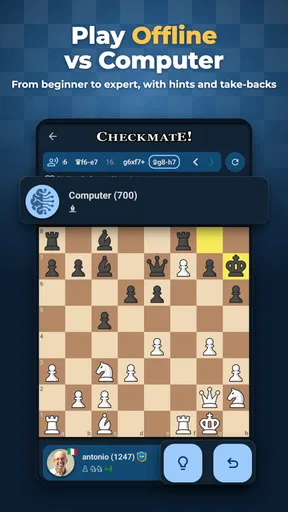
For those times when you're offline or just want to practice without any distractions, the app's offline mode is your go-to. You can adjust the difficulty of the AI opponent to suit your level, making it perfect for both casual play and serious practice sessions.
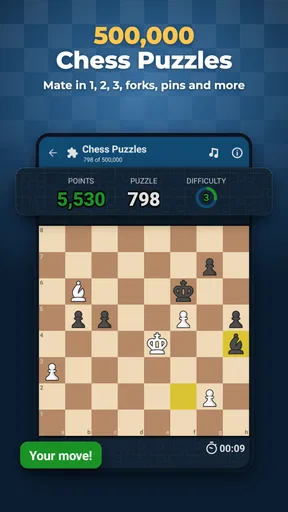
Moreover, the app offers a "puzzle mode," which throws different chess scenarios at you to solve. It’s a fantastic way to improve your tactical skills and keep your mind sharp. Plus, it's surprisingly addictive!
The useful trade-off with an AI opponent is control: you can play on your own schedule and repeat a situation without waiting for another person. That makes offline sessions a good choice for learning how pieces work or warming up before a competitive game. But a computer opponent is not a substitute for the unpredictability of a human player, and a puzzle tests a particular position rather than the full decisions of a match. I’d alternate between puzzles, games against the AI, and online opponents if I wanted a rounded routine.
A simple workflow can keep those modes purposeful. Start with a puzzle when you have a few spare minutes, play a longer offline game when you want to think without time pressure, and save online play for when you can give an opponent your attention. If a difficulty setting feels either effortless or overwhelming, adjusting it is more useful than repeatedly playing at a level that teaches you little. The point is not to win every session; it is to find a challenge that makes you consider your choices.
Design and Usability
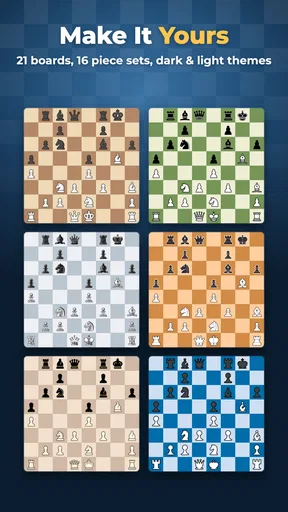
Visually, the app is a treat. The graphics are clean and modern, with a variety of board and piece designs to choose from. The developers have clearly put a lot of thought into making the game aesthetically pleasing without being distracting.
In terms of usability, the app is smooth and responsive. Whether you're playing on a high-end smartphone or a more budget-friendly one, the app performs well. This is crucial for maintaining concentration during those intense matches.
Chess requires attention to the board, so a clear layout is more than decoration. I’d choose a board and piece style that makes it easy to distinguish the pieces at a glance, then keep that choice for a while rather than changing it between games. Familiar visuals reduce needless hesitation, especially on a small phone screen. If you play in short bursts, this kind of consistency can make it easier to pick up a game and focus immediately.
For device compatibility, the current version is 2.8.15 and the minimum operating system is Android 7.0. It is rated for Everyone, so it is broadly suitable for players of different ages, though younger users should still follow the usual family guidance for online interaction. The game was released on September 4, 2024, and has around 1,900 written reviews. I’d consider those details alongside your device and preferences, not as a guarantee that every feature will suit every player.
Oh, and did I mention it's free? Sure, there are ads and in-app purchases, but they’re not intrusive, and the free version offers more than enough functionality for most users.
Where it sits among chess apps
Compared with a physical board, a phone app is easier to carry and lets you practise when nobody nearby wants to play. Compared with a chess app focused mainly on online competition, the draw here is having offline play and puzzles alongside matches with other people. That combination suits someone who wants one place for different kinds of chess sessions. A dedicated study resource may be a better fit for a player seeking a highly structured training plan, while a physical board remains preferable for face-to-face play and the feel of moving real pieces.
The choice also depends on how you respond to a phone screen. If you find notifications or a small board distracting, a real board and a quiet room may help you concentrate more. If you want to play while travelling or have no opponent available, digital play is plainly more convenient. I see this app as a flexible companion for everyday chess, not a replacement for every way of studying or playing the game.
Who will get the most from it
I’d recommend it most to beginners who want a low-pressure way to learn and then put the rules into practice, and to casual players who like switching between solo sessions and online games. It also makes sense for someone who already knows the basics and wants a convenient board for quick matches. Since it is free to start, you can find out whether its approach suits you before spending anything.
It is less suited to players who want only face-to-face chess, who dislike playing on a phone, or who need a very specific coaching or analysis workflow. A serious competitor may prefer a service built around the exact training tools or community they already use. Likewise, if you only want a simple offline board and never intend to play other people, the online side may add little value for you. Those aren’t flaws so much as reasons to choose a more focused alternative.
If you’re new, a practical first session is to learn a few rules, try an offline game at a comfortable difficulty, and then solve a puzzle rather than jumping straight into a fast online match. If you already play, use a longer time control when you want to practise careful planning, and choose quicker games only when speed is part of the fun. That approach helps you judge the app on the kind of chess you actually want to play instead of expecting one session to answer everything.
Final Thoughts
All in all, the Chess Online & Offline app is a fantastic choice for anyone looking to dive into the world of chess. Its combination of intuitive design, comprehensive features, and seamless online play makes it a standout in the crowded field of chess apps.
Whether you're a newbie eager to learn or a seasoned pro looking to challenge yourself, this app has everything you need to enjoy and improve your game. So, what are you waiting for? Grab your virtual chessboard, and let the games begin!
My verdict is to try it if you want a free, flexible way to play chess both with people and on your own. Its strongest value is convenience and variety: online games for competition, offline play for practice, and puzzles for short tactical sessions. Keep expectations grounded if your priority is advanced coaching, a specific competitive community, or the experience of a real board. Start without paying, see which modes you actually return to, and consider an in-app purchase only if its individual value is clear to you.
Pros
- User-friendly interface for beginners.
- Offline mode available for practice.
- Multiple difficulty levels to choose from.
- Engaging multiplayer features.
- Regular updates with new challenges.
Cons
- Contains ads in the free version.
- Occasional connectivity issues online.
- Limited chat features in multiplayer.
- Requires in-app purchases for extras.
- Graphics could be more modern.
FAQs for Chess Online & Offline
What are the key features of Chess Online & Offline?
Chess Online & Offline offers a comprehensive chess experience with features like real-time multiplayer matches, a variety of difficulty levels for AI opponents, and offline play options. The app also includes puzzles, tutorials for beginners, and detailed game statistics to help players track their progress and improve their skills.
Can I play Chess Online & Offline without an internet connection?
Yes, Chess Online & Offline provides the flexibility to play without an internet connection. You can enjoy challenging AI opponents or practice with puzzles and tutorials offline, making it perfect for use in areas with limited connectivity or while traveling.
Is there a multiplayer option available in Chess Online & Offline?
Absolutely! Chess Online & Offline features a robust multiplayer mode where you can compete against friends or other players worldwide. It includes matchmaking options to find opponents of similar skill levels, ensuring a fair and competitive game environment.
Are there any in-app purchases in Chess Online & Offline?
While Chess Online & Offline is free to download and play, it does offer in-app purchases. These typically include premium features such as advanced tutorials, additional board themes, and ad-free experiences. However, the core gameplay remains fully accessible without any purchases.
How beginner-friendly is Chess Online & Offline?
Chess Online & Offline is designed to cater to players of all skill levels. Beginners can benefit from the app's tutorials and guided lessons that cover the basics of chess. Additionally, adjustable AI difficulty levels allow new players to gradually improve at their own pace.


